








Imagine getting deep into a real estate deal only to learn that a neighbour has a legal right‑of‑way across your client’s property. Or finalizing your site plan only to discover an underground utility easement running straight through your planned building footprint. These are common issues that can instantly change how a property can be used, valued, or developed.
That’s why understanding easements early is so important, and why we created the latest enhancement to GeoWarehouse, the new Easement Check Tool.
The Critical Role Easements Play in Property Decisions
Easements are legal rights that allow third parties to use a portion of a property for specific purposes such as access roads, utilities, or shared driveways. These rights can significantly impact access, development potential, and the long‑term use and value of a property. When easement details are identified early, property research becomes more accurate and decision making more informed.
Easements may:
- Impact property value or marketability
- Limit where structures can be built or expanded
- Affect access points, driveways, or shared pathways
- Grant rights to utility companies or neighbouring properties
- Influence future development potential
- Create obligations for maintenance or shared use
- Affect commercial operations, tenant planning, or site design
Understanding these details upfront helps you protect your clients, reduce risk, and make informed recommendations.
How Does the Easement Check Tool in GeoWarehouse Work?
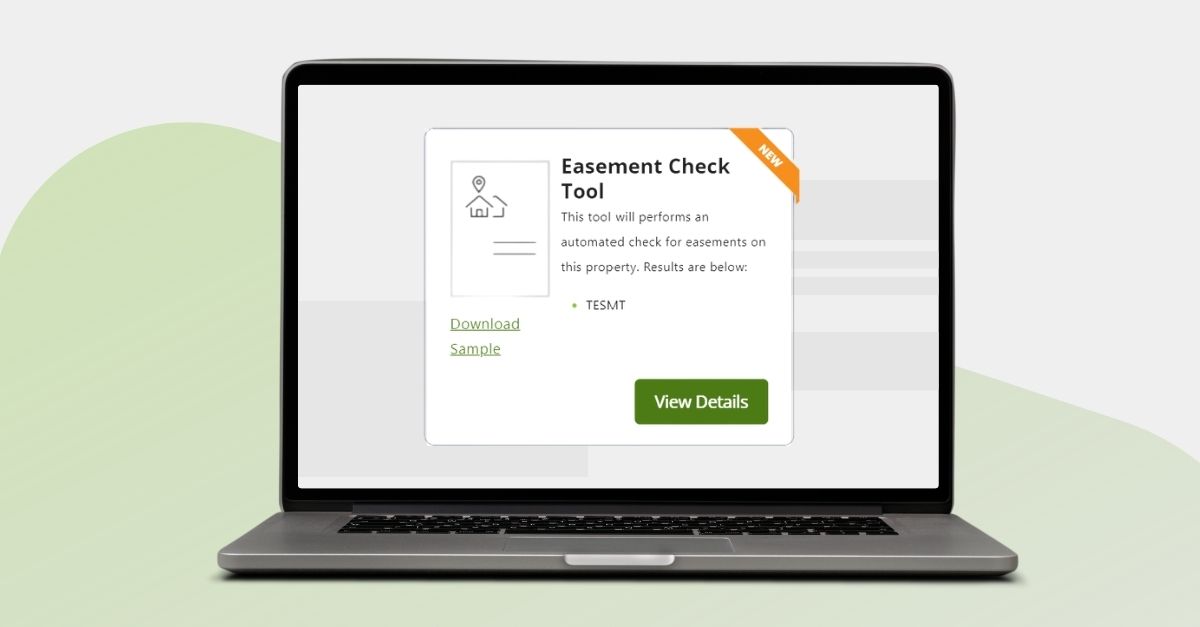
Simply search for your subject property in GeoWarehouse and open the Property Report. If any of the common easement documents are found on the property record, the Easement Check Tool will appear and show you which types are registered on Title. From there, you can choose to purchase the Parcel Register and the specific easement instrument(s) for further information.
What Easement Document Types Are Identified by the Easement Check Tool?
The Easement Check Tool can identify the following document types:
- Transfer of Easement (TESMT)
- Transfer of Right of Way (AGRW)
- Agreement re Easement (AGEASE) (AGESMT)
- Agreement re Right of Way (TRW)
- Condominium Declaration (CONDEC)
A Condominium Declaration’s primary role is to define the ownership structure of the condominium and outline the rights and responsibilities of unit owners. However, easements can also be created within Condominium Declarations, which is why these documents are included in the Easement Check Tool.
Real World Examples of How Easements Could Impact Your Business
Developers |
| A developer plans to build an addition on a commercial site. An easement for underground utilities runs directly through the proposed expansion area. Identifying this early prevents costly redesigns, delays, and permit issues, and allows the developer to adjust the site plan before committing resources. |
Real Estate Agents and Appraisers |
| An appraiser is valuing a residential property where the backyard appears large enough for a future addition. During the review, they identify a utility easement running along the rear portion of the lot. This easement restricts any permanent structures in that area. Knowing this early allows the appraiser to adjust the highest and best use analysis, refine the valuation, and clearly explain the limitation in the report. |

Geowarehouse Tools: The Difference Between the Easement Check Tool and the Title Check Tool
When searching a subject property in GeoWarehouse and reviewing the Property Report, the Easement Check Tool and Title Check Tool will display whenever the relevant data is available.
The Title Check Tool will appear if any of the 13 most common encumbrances are listed on title: Mortgage, Liens, NOSI (which may still appear on title even if they are no longer enforceable), Condo Declaration, Condo Plan, Cautions (Land, APS, Estates etc), Court Orders, Certificate of Tax Arrears and Debentures. If any are present, you can purchase a Parcel Register and the associated instrument for full details.
Similarly, the Easement Check Tool will display when a document appears on title that purports to create an easement. From there, you can choose to purchase the associated reports for any easement that appears.
Important Note: In some cases, easements are not registered as separate instruments on title. Instead, they may be created in prior documents only referenced in the property’s legal description. In such cases, the easement reference typically appears in the property description, where a document number will appear and be preceded with “subject to” (s/t) and/or “together with” (t/w).
Because the easement creating document does not appear in the instrument list on those PINs, the Easement Check Tool will not identify those easements. You will need to continue to carefully review the property description to identify those circumstances.
Find The Easement Check Tool in Geowarehouse Today
The Easement Check Tool is now live in GeoWarehouse, giving you a faster and more efficient way to access key easement information. See a snapshot of what an easement document looks like or learn how to access it.
Interested in learning more about this tool and how easements and other title documents can help? Register for an upcoming course by visiting the Training Calendar in the GeoWarehouse Academy.